
Introduction
Rspress is a static site generator based on Rsbuild, rendered with the React framework. It comes with a default documentation theme, and you can quickly build a documentation site with Rspress. You can also customize the theme to meet your personalized static site needs, such as blog sites, product homepages, etc. Of course, you can also integrate the corresponding plugins provided by the official to easily build component library documentation.
Why Rspress
Rspress is designed around the following core features:
- Build Performance. Ensuring a fast enough startup speed brings a good development experience.
- AI-friendly. Technical documentation not only serves human readers but can also be better understood and utilized by AI through SSG-MD.
- MDX Support. Through MDX, we can conveniently reuse document fragments and render custom React components in documents.
- Basic Capabilities of Documentation Site. Including internationalization, multi-version support, full-text search, component library documentation, etc.
- Extensibility. Provides a built-in plugin system, supports extending Rspress through plugin API.
These also represent some core requirements for static site development. The following will introduce these aspects separately.
Build performance
As the project becomes larger and larger, team members often worry about the lengthy project startup time, which negatively affects the development experience. The longer the project development time, the more obvious this deterioration of experience.
We couldn't help but start thinking, can we break the limitations of the current community tool chain, break through the performance bottleneck of the existing SSG framework, and achieve the effect of instant startup for most project scenarios?
Then, we continued to explore in this direction and finally achieved this effect on Rspress.
In Rspress V2, we have made significant performance improvements through multiple optimization methods:
- LazyCompilation. LazyCompilation compiles on-demand in dev mode. Pages are only compiled when you visit them, significantly improving development startup speed and even achieving millisecond-level cold starts.
- Persistent Cache. For production builds, persistent cache is enabled by default, reusing previous compilation results during warm starts to improve build speed by 30%-60%.
- Rspack Bundler. Rspress uses Rspack developed by the team. Rspack is a Bundler based on Rust, with built-in multiple performance optimization methods, such as multi-threaded parallel compilation, incremental compilation, etc., which are 5 to 10 times more efficient than traditional packaging tools in the community.
At the same time, Rspress internally also applies many other build optimization methods. These optimization methods, combined with the powerful Rust front-end toolchain, push the compilation performance of the SSG framework to a new height.
AI-friendly
With the rise of large language models, technical documentation needs to serve not only human readers but also be better understood and utilized by AI.
Rspress V2 introduces SSG-MD capability, which renders pages as Markdown files instead of HTML files and generates index files compliant with the llms.txt specification.
Once enabled, the build output will include llms.txt (an index file showing page titles and descriptions in navigation and sidebar order), llms-full.txt (a complete file containing Markdown content from all pages), and .md files corresponding to each route.
Just as SSG can generate static HTML files to improve SEO, SSG-MD can relatively improve GEO (Generative Engine Optimization) and the quality of static information for large models.
For detailed usage, please refer to the SSG-MD documentation.
MDX support
In order to ensure the flexibility of content development, Rspress chooses to support the MDX content format.
MDX represents a method of componentized content organization. In other words, documents serve as components, allowing for the reuse of document fragments across different documents. Additionally, custom React components can be incorporated into documents, significantly enhancing the flexibility of document development.
Basic capabilities of documentation site
Of course, Rspress has also done a lot of work on the polishing of the basic capabilities of the documentation site, supporting the following functional features:
- Automatically generate layouts, including navigation bars, left sidebars, etc.
- Static site generation, HTML is directly output after production build.
- Internationalization, support for multi-language documents.
- Full-text search, provide out-of-the-box search function.
- Multi-version document management.
- Custom document theme.
- Automatically generate component Demo preview and playground.
In the following text, we will introduce these functional features in detail.
Extension mechanism
Rspress internally designed various extension mechanisms to ensure sufficient customization capabilities, including:
- Support for custom global components, global styles, page layout structure, please refer to Custom Page.
- Support build extension, including custom Rspack config, adding MDX compilation plugins, etc., please refer to Build Extension.
- Support custom theme, please refer to Custom Theme.
- Built-in plugin system, support for custom plugins, please refer to Plugin System.
Features
Next, let's introduce the main functional features of Rspress.
Brand new theme
Rspress V2 introduces a completely redesigned theme, featuring significant improvements in visual effects and reading experience while providing exceptional customizability.
BEM naming convention
All built-in components now adopt the BEM naming convention. This enables developers to flexibly adjust styles through standard CSS selectors, avoiding conflicts with tools like Tailwind CSS and significantly lowering the barrier for style customization.
Rich CSS variables
The new theme exposes more CSS variables, covering styles for theme colors, code blocks, homepage components, and more. You can interactively preview and adjust these variables on the CSS Variables page.
rspress eject Command
When CSS variables cannot meet your customization needs, you can use the new rspress eject command to copy the source code of built-in components to your project's theme directory for complete customization.
Automatic layout generation
For the construction of a documentation site, in addition to displaying the main content, we generally need the following layout modules:
- Navigation bar, used to provide global navigation entrance.
- Sidebar, used to display the article directory under the current navigation.
- Article outline column, used to display the outline structure of the current page.
For the document outline, Rspress will automatically extract the various titles in the document, generate outline information, and display it on the right side of the article page by default, without any other operations.
For the navigation bar and sidebar, we provide two config methods, you can choose one of them:
- Declarative config. Configure the corresponding data by declaring
_meta.jsonin the directory, such as:
You can read the Auto Nav/Sidebar for config details.
- Programming config. Implement it by specifying the nav and sidebar config items in the Rspress config.
We recommend using declarative config under normal scenes, which has many benefits:
- Make config file is more concise and clear.
- The correspondence between the
file directory structureand thesidebar directory structureis more intuitive. - When adding or deleting a sidebar directory, operate directly in the current directory, instead of going to the
rspress.config.tsconfig file to locate the corresponding position and then add/delete the config, thereby reducing the cost of switching development context.
The programming config is very useful in some scenarios where dynamic config generation is needed. For example, the official Rspress TypeDoc plugin will automatically convert a json data provided by TypeDoc into nav and sidebar configs.
MDX support
MDX is a powerful content development format. You can not only write Markdown files as usual, but also use React components in the content of Markdown:
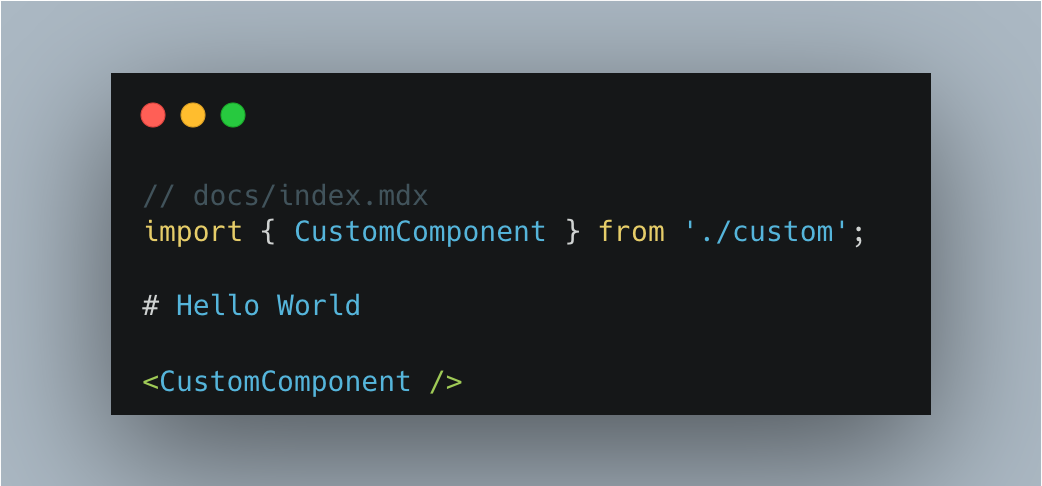
In addition, Rspress also supports some specific syntax, such as:
- Custom container syntax.
- FrontMatter metadata definition.
- Code line highlighting syntax.
Details can be found in the Use MDX Document.
Code highlighting with Shiki
Rspress V2 uses Shiki by default for code highlighting. Compared to runtime highlighting solutions, Shiki performs highlighting at compile time, achieving accurate syntax highlighting consistent with VS Code based on TextMate grammar, without adding runtime overhead or bundle size.
You can customize code block color schemes through CSS variables, and interactively switch and preview different Shiki themes on the CSS Variables page. Shiki also allows extensions through custom transformers to enrich writing, such as twoslash.
SSG
Rspress is a SSG framework. In the build process in the production environment, it will automatically help you generate static sites, that is, generate HTML content for each page. After the build process is completed, HTML will appear in the default output directory.
Then, you can deploy the contents of this product directory to any static site hosting service, such as GitHub Pages, Netlify, Vercel, etc.
At the same time, we also provide config to easily customize the HTML content generated by SSG. For details, please refer to the Static Site Generation Document.
Internationalization (I18n)
Internationalization is a common requirement in a document-type site, and Rspress encapsulates the ability of internationalization to be simple and easy to use. In Rspress, we abstract internationalization into the following requirements:
- How to define I18n data source?
- How to configure the site under different languages?
- How to organize the document directory of different language versions?
- How to use I18n data source in custom components?
Rspress V2 includes translations for Chinese, English, Japanese, Korean, and more languages built-in, with more to come. The system automatically performs "Tree Shaking" based on language configuration and usage, bundling only the text you need. You can also easily extend or override translations through the i18nSource configuration option.
You can follow the I18n Tutorial to step by step to implement internationalization for your site.
Multi-version Documents
In some scenarios, we need to manage multi-version documents, and Rspress has built-in support for multi-version documents. On the one hand, you can enable this capability through simple config. On the other hand, you only need to organize the directory as usual, without introducing unnecessary directories and concepts, minimizing the mental burden:
Full text search
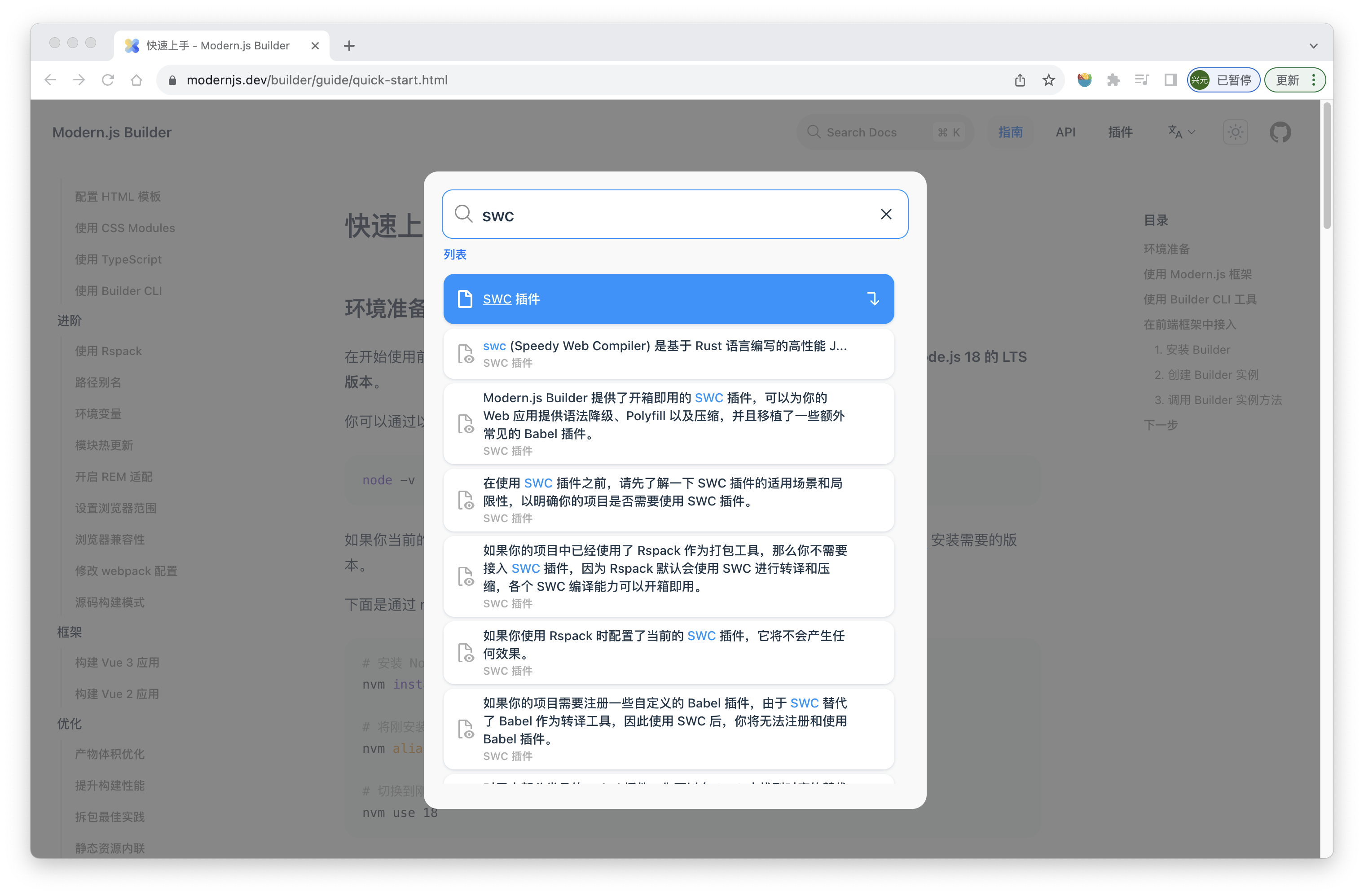
Rspress provides out-of-the-box full-text search capabilities, which you can access without any config. It is based on the open-source FlexSearch engine, with the following effect:
Custom theme
Rspress supports two ways to customize themes:
- Extend from the default theme. In each component of the default theme, many slots are provided for you to add custom layout content, for example:
- Fully customized theme. If you want to develop a custom theme from scratch, you can customize the content of Layout and use various Runtime APIs provided by Rspress (such as
usePageData) to obtain compile-time data, routing information, etc.
For details about custom themes, you can refer to the Custom Theme Documentation.
Plugin system
The plugin system is a crucial part of Rspress, which can help you conveniently extend Rspress's functionality during site construction. Details can be found in the Plugin Introduction Documentation.
Component documentation
Demo preview
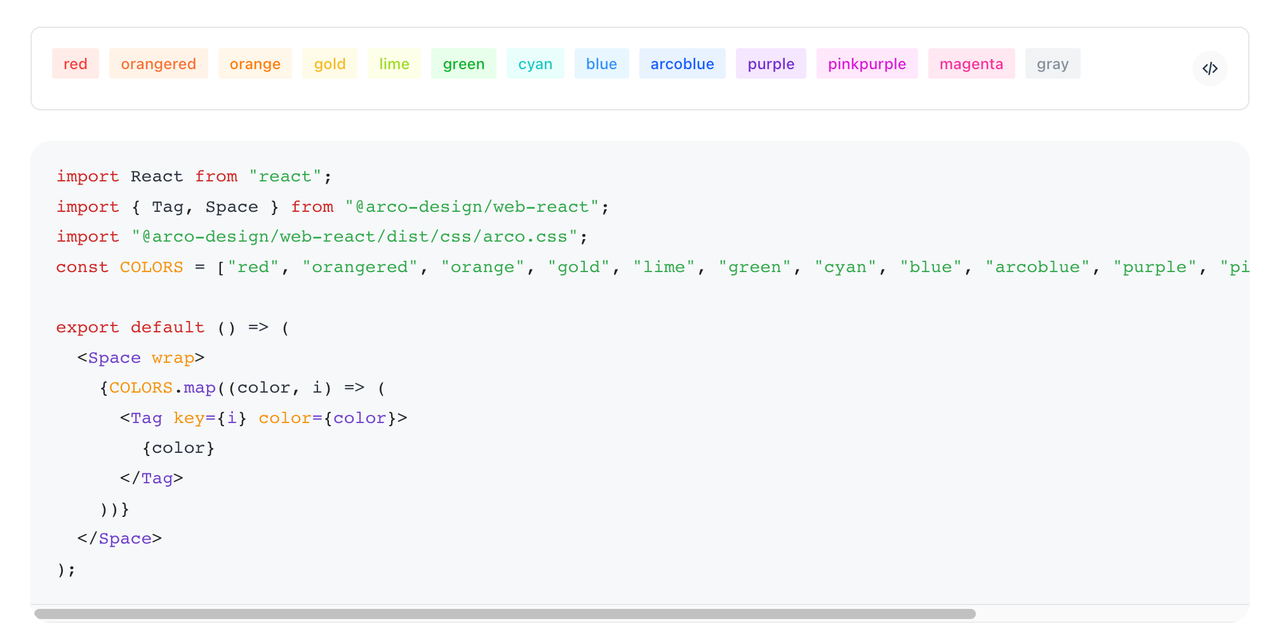
Rspress provides a preview plugin, which can automatically generate component previews for you. After you register the preview plugin, declare the following code block in the mdx file:
Then you can see the following preview effect:
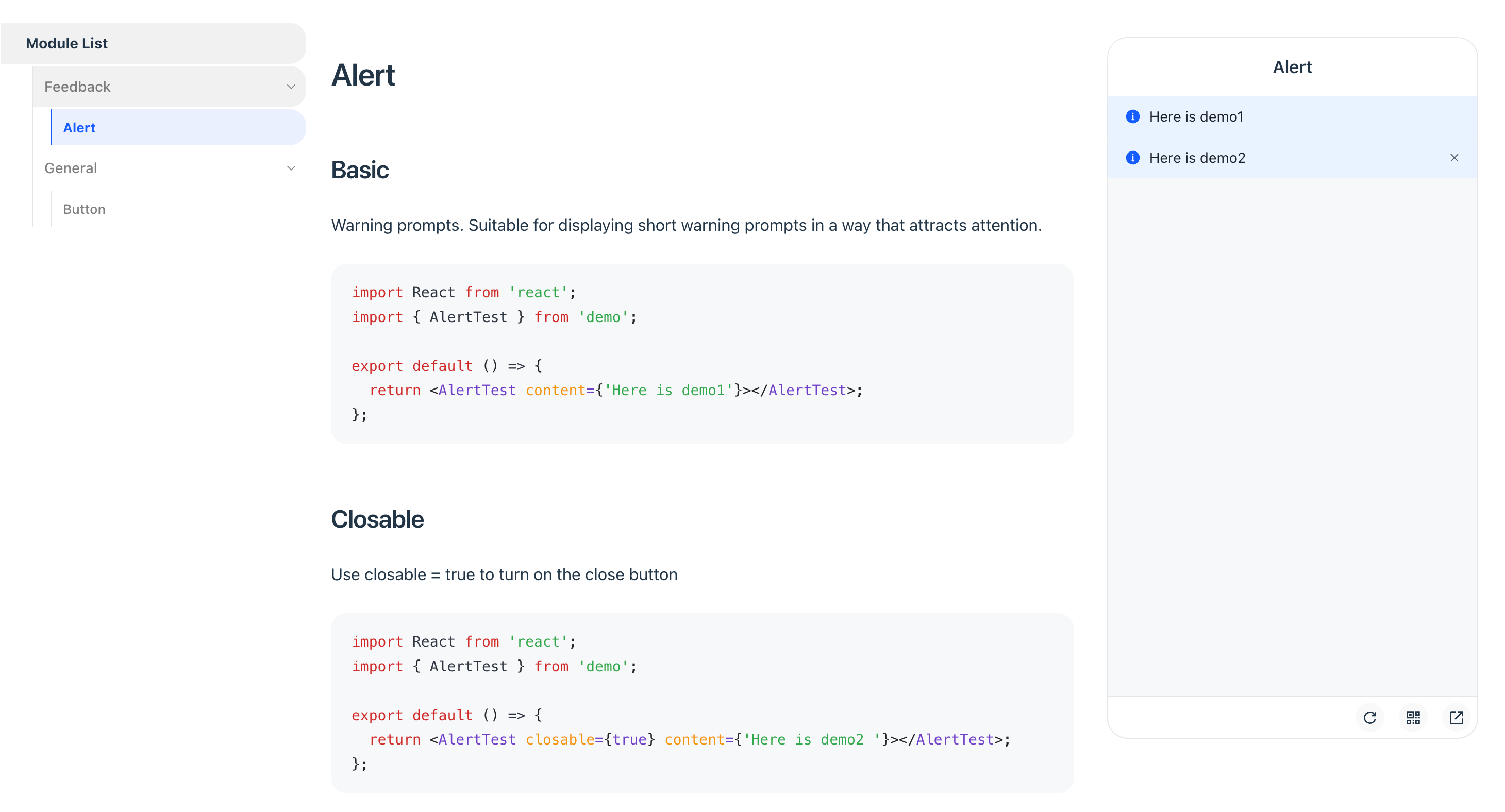
Of course, the plugin also supports mobile preview mode, which you can enable through plugin config:
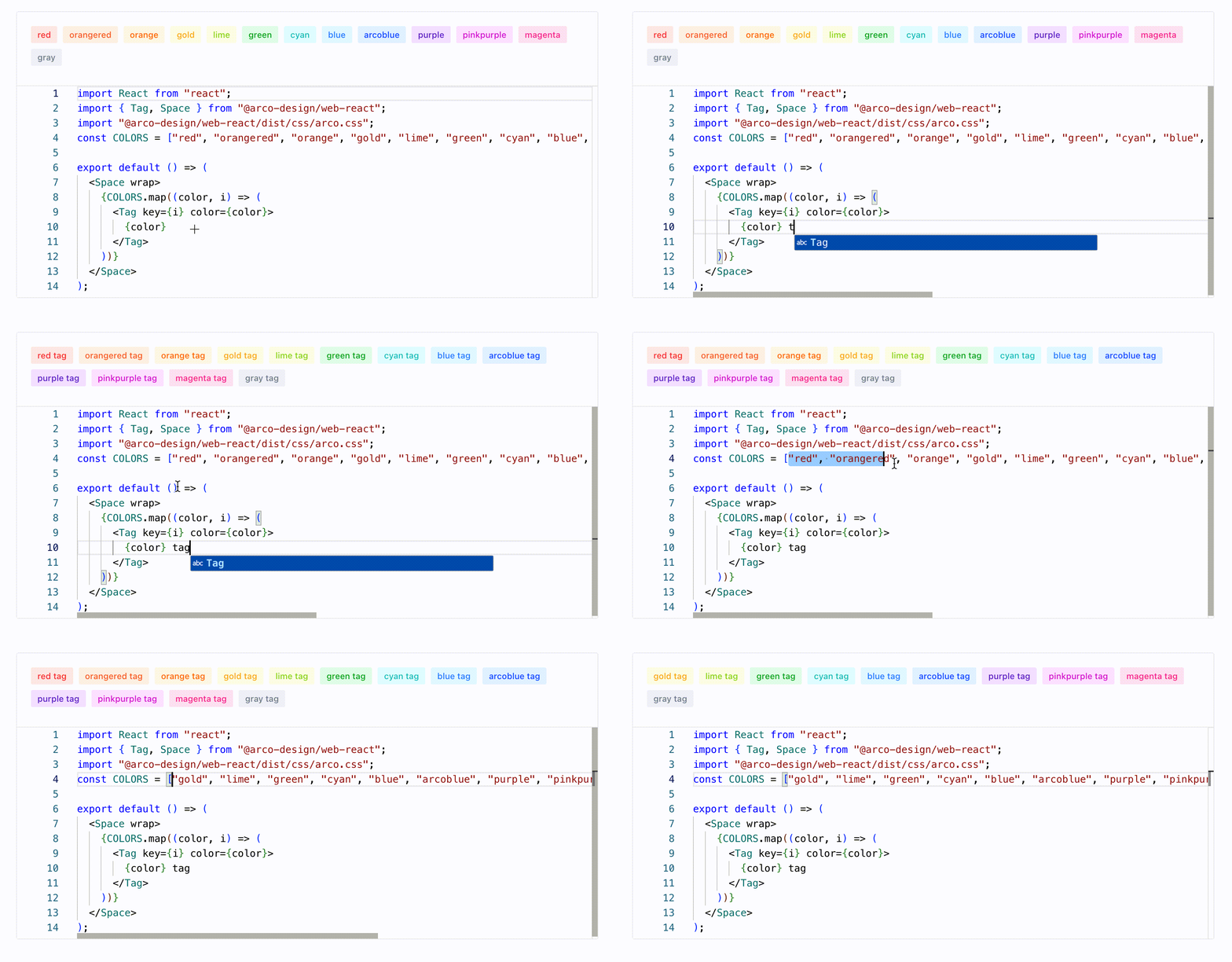
Demo real-time playground
For component documentation, if real-time editing capabilities can be provided for components, it will greatly enhance the interactive experience of the documentation.
To achieve this feature, you only need to register the official playground plugin, and then declare your code block in the .mdx file. (Take the above code block as an example)
Next, you will see the following playground effect in the documentation:
Built-in smooth transition animation
View Transition API is a set of APIs natively provided by modern browsers for implementing transition effects during page jumps. In Rspress, we also followed up on this feature, implemented document transition animations based on View Transition, and did not use any third-party SPA animation schemes. In the future, we will explore more animation effects to further enhance the experience.
Differences from other SSG frameworks
Differences from Docusaurus
Docusaurus is an open-source SSG framework by Meta. Like Rspress, it uses React as the rendering framework and supports MDX. However, the main differences between Rspress and Docusaurus are:
-
Rspress provides better build performance through lazyCompilation and persistent cache, achieving millisecond-level cold starts. For details, see Build Performance.
-
Rspress has simpler config and lower learning curve. Rspress's config is simpler, does not introduce too many concepts, and reduces cognitive load as much as possible. For example, it provides out-of-the-box search functionality, intuitive multi-version document management, etc.
-
Rspress provides a higher level of abstraction for Bundler in its architecture. For low-level Bundlers like webpack and Rspack, their config items are complex and not easy to get started with. Docusaurus chooses to directly expose the config items of the underlying Bundler, while Rspress provides a higher level of abstraction for Bundler, offering simpler and more user-friendly config items. For instance, you can easily add tags in
<head>throughbuilderConfig.html.tags, without having to register related plugins via Bundler likehtml-webpack-plugin.
Differences from Nextra
Nextra is an open-source SSG framework by Vercel. Like Rspress, it also uses React as the rendering framework and supports MDX. The main differences between Rspress and Nextra are:
- Rspress has better build performance. This point can be referred to "Differences from Docusaurus".
- Rspress is overall lighter. Nextra relies on Next.js, and its SSG process is also based on Next.js. Therefore, the SSG output is not purely HTML files, but includes some runtime code from Next.js. On one hand, this leads to a larger size of Nextra's output. On the other hand, it needs to be deployed as an application (using the
next startcommand) rather than being deployed as a pure static site. But Rspress is not bound to any application framework, so its output is lighter and can be conveniently deployed as a pure static site.
Differences from VitePress
VitePress is a static site generator based on Vite. It is characterized by using Vue as the rendering framework and has excellent performance. The main differences between Rspress and VitePress are:
- Rspress uses React as the rendering framework, while VitePress uses Vue.
- Rspress uses MDX for content development, while VitePress uses Markdown and supports Vue components in Markdown, which also leads to differences in the implementation of the underlying compilation toolchain.
- In terms of build performance, during the development phase, both Rspress and VitePress can quickly start a project. However, in the production environment, VitePress needs to bundle the project based on Rollup, so it will face similar performance issues with other JavaScript-based toolchains. At this time, Rspress will have faster build speed.
Try Rspress
Go to Quick start to learn how to use Rspress to quickly build a documentation site.